Confidential workspaces
Not every Codesphere instance offers confidential compute. Ask your Codesphere administrator whether confidential compute is available on your instance. See Prerequisites.
The landscape services of a workspace can be run in confidential mode. The IDE deployment always runs unconfidential, since it is not expected to handle sensitive data.
Prerequisites
- You have a trustee service and its API address.
- You have requested a workload ID from the trustee provider. See Request a confidential workload.
- The secrets that are referenced by the landscape and cannot be autogenerated are stored in the trustee service vault. See Manage secrets in the trustee service vault.
- The services of your landscape do not depend on the workspace's shared NFS. See Prerequisites.
Creating a workspace with confidential landscape
To create a workspace with a confidentially running landscape, create a workspace as usual and enable the confidential option.
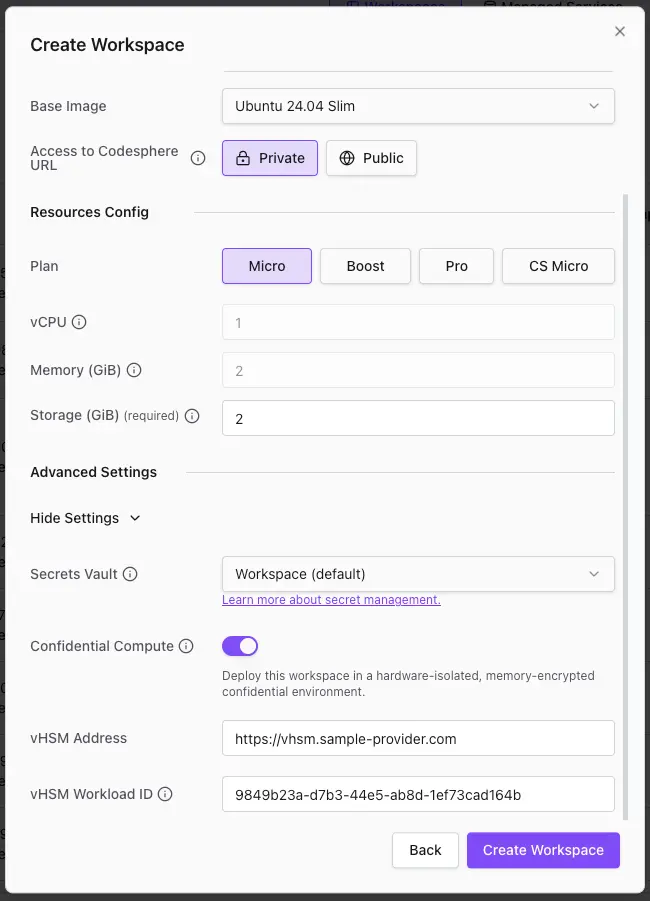
Enter the trustee service URL and the workload ID that you received from the provider.
On landscape sync, the services get deployed in confidential mode automatically.
See confidential workspaces
In the workspaces overview table, you can see which of the workspaces are confidential and under which trustee provider and workload ID they are registered.