Introduction to Codesphere
Codesphere is a virtual cloud platform. Think of it as a self-hostable cloud provider. It upgrades any infrastructure into a modern cloud environment. The platform provides tooling throughout the software lifecycle for development, deployment, and operations. Instead of stitching together disparate tools and services, Codesphere provides a consistent, declarative definition: the Landscape.
At its core, Codesphere transforms infrastructure & runtime configuration for each application into a single configuration file. This declarative approach means your entire microservice architecture, including compute runtimes, managed services, networking rules, and deployment strategies, lives in version control. You can deploy it consistently across any environment.
Jump straight to our Getting Started Guide to deploy your first application in under 5 minutes.
The Development Lifecycle in Codesphere
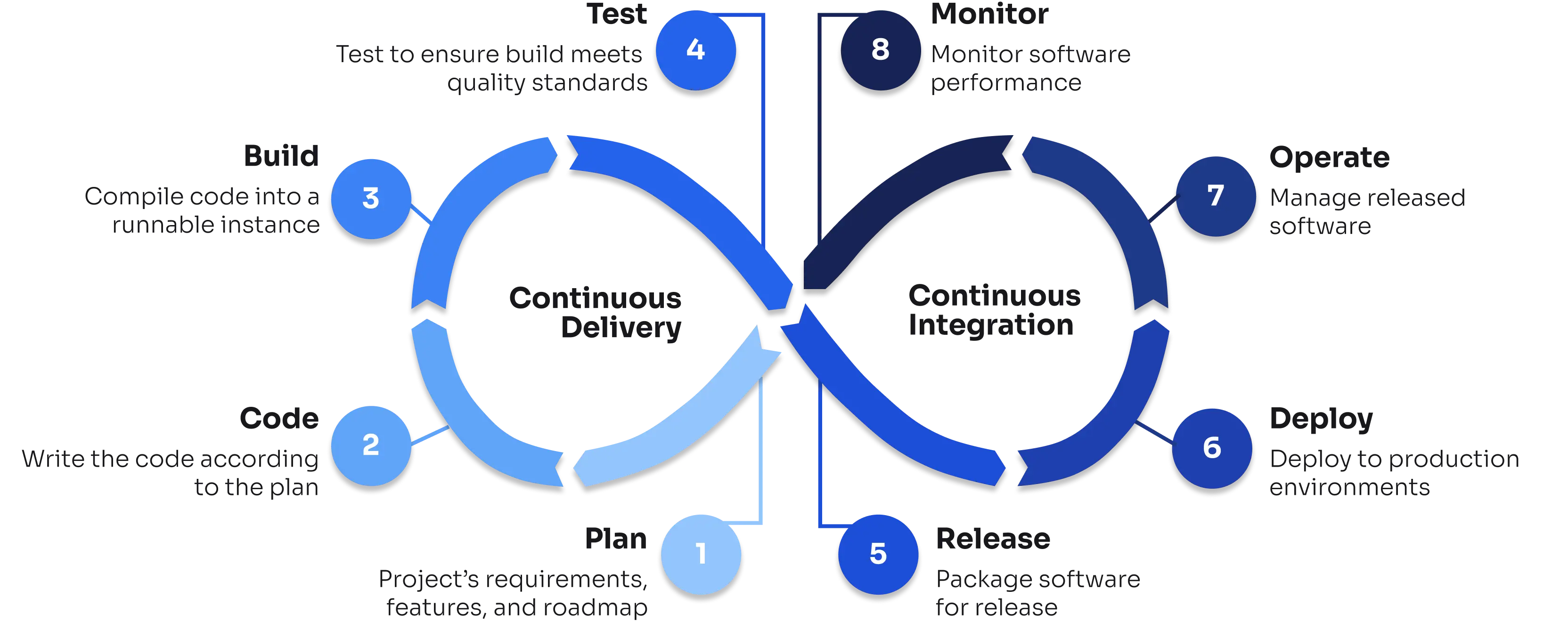
Codesphere supports entire enterprise software development lifecycles with integrated tooling at every phase. The diagram below illustrates how these stages connect seamlessly within the platform and the following sections link to detailed documentation for each phase:
Code & Plan: Development & Collaboration
Start coding immediately with production-identical development environments that eliminate the "works on my machine" problem.
Development:
- Cloud IDE: Full-featured browser-based IDE with IntelliSense, debugging, and collaborative editing
- Local IDE Integration: Connect VS Code, JetBrains IDEs, or any SSH-capable editor to work locally while executing remotely
- VS Code Server: Run VS Code in the browser with all your favorite extensions
- Git Integration: Built-in Git support with pull request workflows and branch management
Security & Configuration:
- Secret Management: Secure environment variables and secrets injected at runtime, never stored in Git
- Environment Variables: Manage configuration across different deployment stages
Team Collaboration:
- Organizations & Teams: Structure access and organize workspaces by team
Build: Pipelines & Runtime Configuration
Define your build and deployment pipeline declaratively, with support for both native builds and external artifacts.
CI Configuration:
- Configuring CI Pipelines: Define build, test, and deploy stages in
ci.yml - CI Profiles: Create reusable pipeline configurations for different environments
- Configuring a Landscape: Compose your complete application architecture declaratively
Integration & Automation:
- CLI Tools: Automate operations with the Codesphere CLI
- Public API: Programmatic access to platform features
Test: Preview Environments & Review Tools
Automatically provision isolated test environments for every pull request, with full production parity.
Preview Deployments:
When a Pull Request is opened, Codesphere automatically creates a temporary, isolated Landscape running the exact code from your PR. These ephemeral environments share the same architecture as production, enabling accurate QA and integration testing without affecting live services.
Preview environments include Figma-style commenting capabilities, allowing team members to leave contextual feedback directly on your deployment's frontend—perfect for design reviews and stakeholder sign-offs.
Preview deployments can be configured for:
- GitHub: Automatic PR environments with status checks
- GitLab: Merge request deployments
- Bitbucket: Pull request testing environments
Deploy: Runtime Options, Managed Services & Networking
Migrate existing applications easily, thanks to suitable runtime options for many workloads, plus a growing catalog of managed services for databases, caches, and message queues.
Runtime Options:
- Managed Containers: Deploy standard Docker containers with automatic scaling
- Codesphere Reactives: Serverless-style deployments that scale to zero when idle
- Virtual Clusters: Full Kubernetes namespaces for complex orchestration
- Landscape Lifecycle: Manage deployments with blue-green and canary strategies
Managed Services:
- Deploying Services: Provision databases, caches, and message brokers
- Managed Service Provider Reference: Provider-specific connection details and examples
- Custom REST Backends: Template for creating your own service providers
Networking & Domains:
- Path-Based Routing: Route traffic by URL path to different services
- Setting Up A/B Tests: Split traffic for gradual rollouts
- Restricting Domain Access: IP allowlists and authentication
- Private Network (VPN): Connect to on-premise infrastructure
Release: Domains & Service Providers
Control how services are released and made accessible, with tools for custom domain management and extending the platform's service catalog.
Release & Provider Configuration:
- Connecting Custom Domains: Map your domains with automatic TLS certificates and DNS configuration
- Creating Service Providers: Build custom managed service catalogs to extend the platform with organization-specific services
- Deployment & Release Workflows: Automate release processes using the Codesphere API
Platform Administration
Manage teams, control costs, and maintain governance with centralized administration tools.
Administration & Governance:
- Usage & Cost Control: Track resource consumption and optimize costs
- Organizations & Teams: Multi-tenant organization structure
User Management:
- Account Settings: Personal profile and preferences
- API Keys: Generate tokens for programmatic access
- Git Permissions: Configure repository access credentials
- Editor Settings: Customize your development environment
- Accessibility: Configure accessibility options
Monitor: Observability & Insights
Built-in observability with real-time metrics, logs, and distributed tracing—no third-party agents required.
Monitoring:
- Enabling Monitoring: Configure OpenTelemetry-based observability
- Monitoring Landscape Health: Real-time CPU, memory, and resource metrics
- Log Browser: Centralized log aggregation and search
- Request Browser: Distributed request tracing across services
- Usage Monitoring: Track resource consumption with granular cost breakdowns and audit logs
Private Cloud & Self-Hosted Deployments
For organizations requiring full infrastructure control, data sovereignty, or air-gapped environments, Codesphere offers a complete self-hosted solution. Deploy on any cloud provider or bare metal with full network isolation support, centralized management across distributed installations, and the same developer experience regardless of underlying infrastructure.
Private Cloud Options:
- Installation Guide: Step-by-step deployment on your infrastructure
- Installation Options: Choose between cloud, on-premise, or hybrid deployments
- Cluster Ingress CA Options: Configure TLS certificates and trust chains
- Feature Flags: Control platform capabilities per installation
- Cluster Monitoring: Monitor your Codesphere infrastructure
Next Steps
Ready to get started? Here are the recommended paths:
- Deploy Your First Application: Complete quickstart guide with templates
- Understand Core Concepts: Learn about Landscapes and Workspaces
- Explore the Workspace Toolkit: Discover all available development tools
- Browse API & CLI Documentation: Automate your workflows
Help shape the future of Codesphere. Request features or vote on the community roadmap at feedback.codesphere.com.