Creating Service Providers
Codesphere lets you package a service as a Managed Service Provider so other developers can discover and deploy it from the service catalog. Providers come in two types:
- Landscape-based providers deploy a Codesphere landscape (a
ci.yml) as a managed service, orchestrated inside the Codesphere cluster — no backend code required. - REST-based providers connect the catalog to infrastructure you operate through a custom backend that implements the Provider REST API.
For a deeper explanation of the two types and when to use each, see Service Categories. To implement the backend behind a REST-based provider, see Create a Custom REST Backend.
This page explains how to define a provider and how to publish, update, and delete it in Codesphere. You can write the definition by hand, or assemble it in the provider editor in the UI.
Defining a Provider
Prerequisites
- Landscape-based
- REST-based
A landscape-based provider deploys a landscape from a Git repository or from a static build artifact. For a Git repository you need:
- A Git repository containing a valid Codesphere landscape with a
ci.ymlfile. - A provider definition, either as a provider file in the repository (
provider.ymlorprovider.yamlat the root by default, or a custom path via thefilepathargument) or provided directly in the API request. - Git access to the landscape repository. Codesphere pulls the repository through your Git connection, so the account you use to create the provider must have permission to access it. You can manage your Git connections in your user settings.
For an example, take a look at our public URL-Shortener Repository.
The Git connection of the user who created (or last updated) a provider is used for pulling the landscape repository. If that user loses access to the repository, deployments of the provider will fail. To transfer the provider to another user's Git connection, that user sends a PUT or PATCH request for the provider — their connection is then used for pulling. For long-lived providers, consider publishing with a technical user.
A REST-based provider connects to infrastructure through your own backend, so before creating one you need:
- A provider definition, either as a provider file (
provider.yml/provider.yaml) in a Git repository or provided directly in the API request. - A REST backend that implements the Provider REST API and is registered in your Codesphere Private Cloud. See Create a Custom REST Backend.
Provider Schema
The provider definition specifies all metadata and configuration schemas for your service provider. The two provider types share most fields; the main difference is the backend block — landscape-based providers point at a Git repository (backend.landscape), while REST-based providers point at your backend endpoint (backend.api) and can additionally declare plans, capabilities, and backups.
- Landscape-based
- REST-based
name: mattermost
schemaVersion: v1
author: Your Team
displayName: Mattermost
iconUrl: https://example.com/mattermost-icon.png
category: collaboration
description: |
    Open-source team messaging and collaboration platform.
    Supports channels, direct messaging, and file sharing.
teamSingleton: true
backend:
  landscape:
    gitUrl: https://github.com/your-org/mattermost-landscape
configSchema:
  type: object
  properties:
    SITE_NAME:
      type: string
      description: Display name for your Mattermost instance
      default: mattermost
      readOnly: false
    MAX_USERS:
      type: integer
      description: Maximum number of users allowed
      x-update-constraint: increase-only
  required: ['MAX_USERS']
secretsSchema:
  type: object
  properties:
    ADMIN_PASSWORD:
      type: string
      format: password
detailsSchema:
  type: object
  properties:
    hostname:
      type: string
    port:
      type: integer
versions:
  0.0.1:
    ciProfile: debug
    # gitRef can be a commit-hash, branch or tag
    gitRef: 1a410efbd13591db07496601ebc7a059dd55cfe9
    description: Initial release
  1.0.0-rc:
    appVersion: Mattermost v11.10.1
    ciProfile: prod
    gitRef: release-branches/1-0-0-rc
    description: |
      Release Candidate.
      Changelog:
        - Feature X
        - Feature Y
        - Fix Z
  1.0.0:
    appVersion: Mattermost v11.10.1
    ciProfile: prod
    gitRef: release-tags/1-0-0
    description: Long Term Support Release
name: postgres
schemaVersion: v1
author: Codesphere
displayName: PostgreSQL
iconUrl: /ide/assets/managed-services/postgresql.svg
category: Database
description: |
    Open-source database system tailored for efficient data management and scalability.
documentationUrl: https://docs.codesphere.com/managed-services/providers/postgresql
backend:
  api:
    endpoint: http://ms-backend-postgres.postgres-operator:3000/api/v1/postgres
    secret: Bearer <auth-token> # sent verbatim as the Authorization header
capabilities:
  pause: true
  backups: true
  pointInTimeRecovery: true
  highAvailability: true
configSchema:
  type: object
  properties:
    version:
      type: string
      description: Version of the Postgres DB.
      enum: ['17.9', '17.6', '16.13', '16.10', '15.17', '15.14', '14.22', '14.19']
      default: '17.9'
      x-update-constraint: minor-upgrade-only
    userName:
      type: string
      default: app
      pattern: '^(?!postgres$)'
      description: Cannot be "postgres" (reserved for the superuser).
      x-update-constraint: immutable
    databaseName:
      type: string
      default: app
      x-update-constraint: immutable
  additionalProperties: false
secretsSchema:
  type: object
  properties:
    userPassword:
      type: string
      format: password
      x-update-constraint: immutable
    superuserPassword:
      type: string
      format: password
  required: ['userPassword', 'superuserPassword']
detailsSchema:
  type: object
  properties:
    port:
      type: integer
    hostname:
      type: string
      format: hostname
    dsn:
      type: string
      format: uri
    ready:
      type: boolean
  required: ['port', 'hostname', 'dsn', 'ready']
# Defined once; shared by every plan below.
resourceParameters:
  storage:
    pricedAs: storage-mib
    schema:
      type: integer
      minimum: 512
      x-update-constraint: increase-only
  cpu:
    pricedAs: cpu-tenths
    schema: { type: number, readOnly: true }
  memory:
    pricedAs: ram-mib
    schema: { type: integer, readOnly: true }
plans:
  - id: 0
    name: Small
    description: 0.5 vCPU / 500 MB Memory
    parameters: { storage: 10240, cpu: 5, memory: 512 }
  - id: 1
    name: Medium
    description: 1 vCPU / 1 GB Memory
    parameters: { storage: 25600, cpu: 10, memory: 1024 }
# Optional: schemas for the backup store, required only if capabilities.backups is true.
backups:
  configSchema:
    type: object
    properties:
      endpointUrl:
        type: string
        format: uri
        description: S3-compatible endpoint URL for the backup storage.
      destinationPath:
        type: string
        format: uri
        description: S3 bucket URI where backups are stored (must use the s3:// scheme).
      accessKeyId:
        type: string
        description: S3 access key. The associated user must have write access to the destination bucket.
    required: ['endpointUrl', 'destinationPath', 'accessKeyId']
  secretsSchema:
    type: object
    properties:
      secretKey:
        type: string
        format: password
        description: S3 secret key for authentication.
    required: ['secretKey']
Provider Fields
These fields are common to both provider types:
| Field | Description |
|---|---|
name | Unique identifier for the provider. Must match ^[-a-z0-9_]+$. |
schemaVersion | Version string in the format v[0-9]+ (e.g., v0, v1). Together with name it uniquely identifies a provider. |
displayName | Human-readable name shown in the Marketplace UI. |
iconUrl | URL to the provider icon (absolute or relative path). |
category | Grouping category (e.g., databases, messaging, monitoring). |
author | Organization or individual responsible for the provider. |
description | Markdown-formatted description of the service. |
documentationUrl | Optional link to external documentation for the service, surfaced in the UI. |
teamSingleton | Optional boolean. When true, each resource group can have only one non-deleted service for this provider and version. A service that reaches deleted status no longer blocks recreation; a service still being deleted does. Omit or set to false to allow multiple services. |
labels | Optional map of arbitrary key-value strings you can attach to a provider for your own use (e.g. ownership, environment, cost-center). Codesphere does not interpret these values. Up to 50 entries; keys up to 514 characters, values up to 5000 characters. |
configSchema | OpenAPI schema defining user-configurable options. See configSchema. |
secretsSchema | OpenAPI schema defining secret values (e.g., passwords). See secretsSchema. |
detailsSchema | OpenAPI schema defining runtime details exposed after provisioning. See detailsSchema. |
The remaining fields depend on the provider type:
- Landscape-based fields
- REST-based fields
| Field | Description |
|---|---|
backend.landscape.gitUrl | Git repository URL containing the landscape configuration. |
configSchema | OpenAPI schema defining user-configurable options. These values are passed to the landscape as environment variables. |
secretsSchema | OpenAPI schema defining secret values (e.g., passwords). These values are set in the landscape's secrets vault. |
detailsSchema | OpenAPI schema defining runtime details exposed after provisioning. See Default landscape details. |
plans | Optional. Omit or set to [] to disable the plan selection UI. Landscape providers don't have plans. |
versions | Versions of the service that users can deploy. At least one version is required. See Provider Versions. |
Landscape-based providers don't support any capabilities yet. You can still declare them set to false to render an explicit cross ("not supported") in the UI; omitting a capability hides it entirely.
| Field | Description |
|---|---|
backend.api.endpoint | URL of your backend that implements the Provider REST API. Codesphere reconciles services by calling this endpoint. |
backend.api.secret | Optional authentication token, sent verbatim as the Authorization header of every request so your backend can verify the request came from Codesphere. Codesphere adds no scheme, so include the Bearer prefix yourself if your backend expects one. Printable ASCII only. It is stored securely and never returned in API responses. |
capabilities | Optional map of features your backend supports: pause, backups, pointInTimeRecovery, and highAvailability (booleans). See Capabilities. |
backups | Optional. When your backend supports backups, defines the configSchema and secretsSchema for the backup store (e.g. S3 endpoint and credentials). See Managed Service Backups. |
resourceParameters | Optional. The billable resources of your service (CPU, memory, storage, …) and their validation schema, defined once and shared by every plan. See Plans and Resource Parameters. |
plans | Optional. Sized presets that pin concrete values for the resourceParameters. Omit or set to an empty array to hide plan selection and let your backend decide. See Plans and Resource Parameters. |
Configuration Schemas
A provider defines up to three schemas: configSchema, secretsSchema, and detailsSchema. They serve different purposes but are parsed the same way.
configSchema, secretsSchema, and detailsSchema serve different purposes but must each be a valid OpenAPI schema object — that is how Codesphere parses them. As in OpenAPI, properties can be marked as required or given sensible default values.
Codesphere does not show the raw keys to users — it pretty-parses them into human-readable labels in the UI (for example, service_url_frontend_3000 is displayed as Service Url Frontend 3000).
configSchema
The configSchema defines the configuration properties the user sets when creating a service — for example, the PostgreSQL version to deploy. For landscape-based providers these values are passed to the landscape as environment variables (see Passing Configuration to Landscapes); for REST-based providers they are sent to your backend in the create/update request body. Once the service is created, the configuration can be inspected in the service settings. Properties that are not marked as readOnly can be updated later (see Update Constraints).
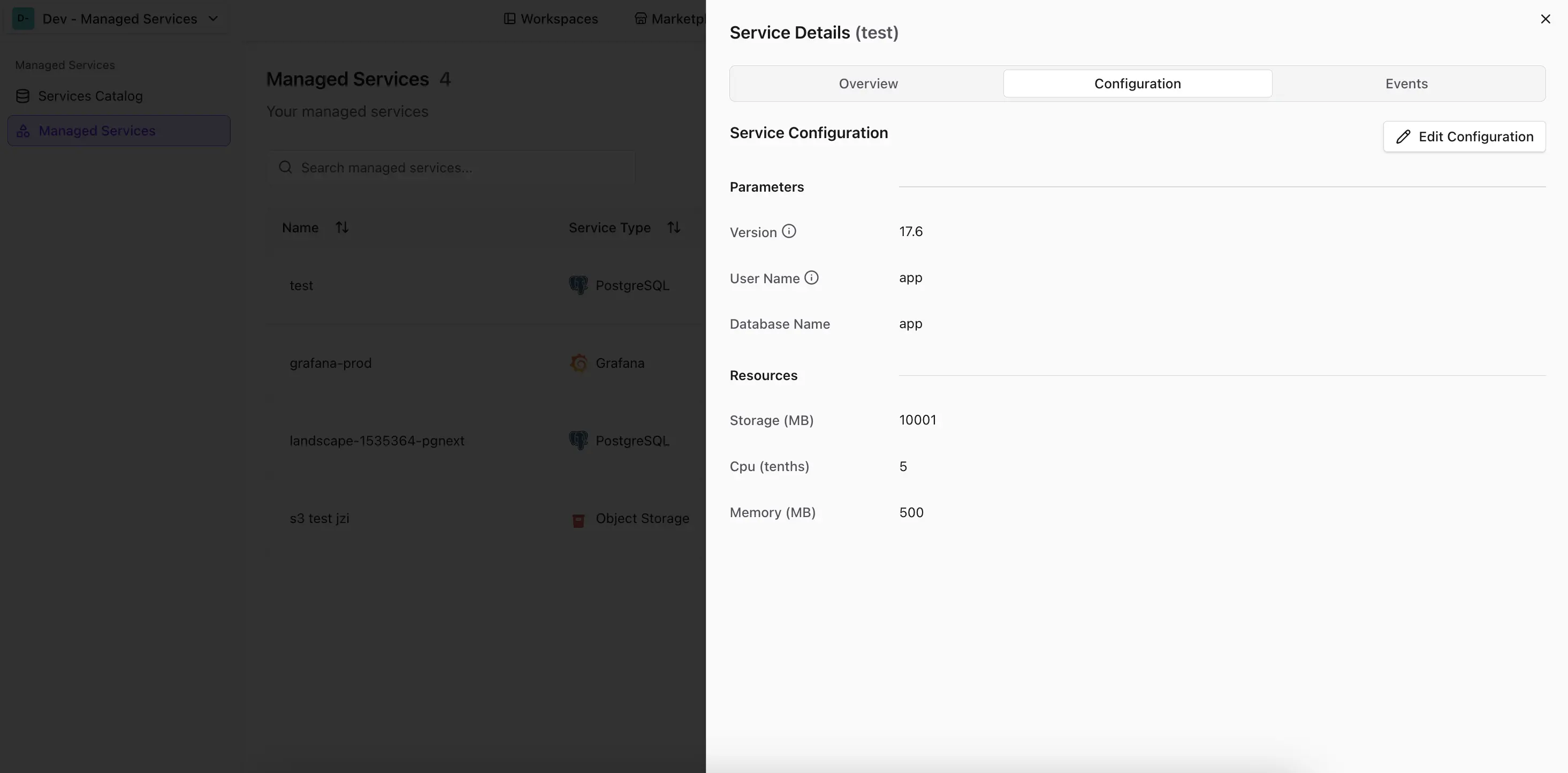
Updating configuration parameters may cause a short downtime of the service.
Update Constraints with x-update-constraint
The configSchema support a custom extension x-update-constraint that lets you restrict how individual properties can be changed after a service has been created. This is useful for enforcing operational rules — for example, preventing storage from being decreased or locking down a database engine version after initial setup.
Add the x-update-constraint keyword to any property:
configSchema:
  type: object
  properties:
    storage:
      type: integer
      description: Storage allocation in GB
      x-update-constraint: increase-only
    version:
      type: string
      description: Version of the Postgres DB.
      enum: ['17.6', '16.10', '15.14', '14.19', '13.22']
      x-update-constraint: minor-upgrade-only
| Constraint | Behavior |
|---|---|
increase-only | The new value must be greater than or equal to the current value. Only applies to numeric fields. |
minor-upgrade-only | The new value may only move forward within the same major version (e.g. 17.6 → 17.9, but not 16.x → 17.x). Intended for version fields. |
immutable | The property cannot be changed once it has been set. |
Update constraints are only enforced when updating an existing service. During initial creation, all values are accepted as long as they pass the standard schema validation.
secretsSchema
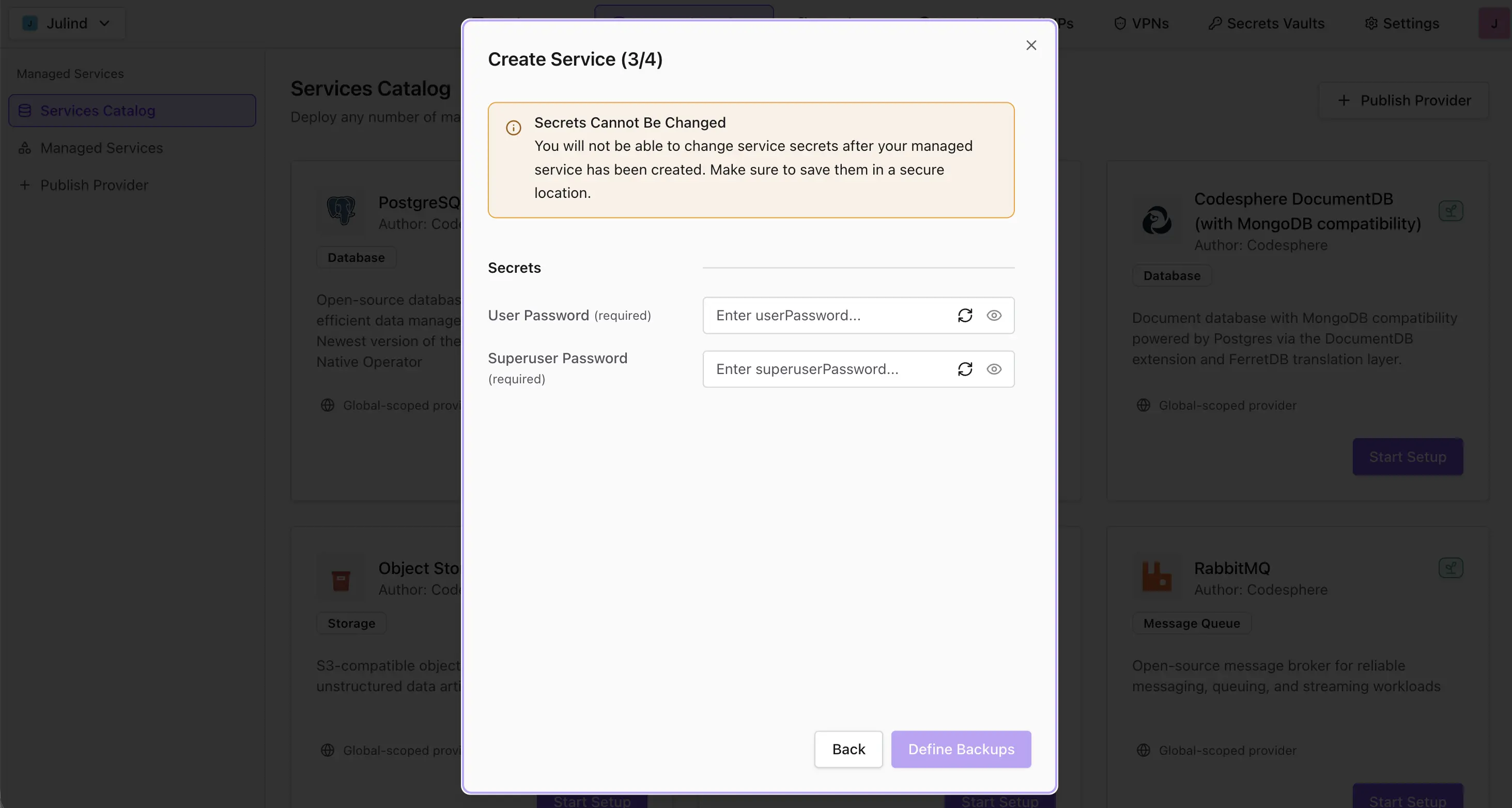
Secrets defined in the secretsSchema appear as form inputs in the create service dialog and must be filled in by the user — for example, the PostgreSQL superuser password. The values are injected into the service during creation: into the landscape's secrets vault for landscape-based providers, or sent to your backend as secrets for REST-based providers. Marking a property with format: password renders it as a masked input with a button that generates a random value matching the property's schema (see Generated passwords).
detailsSchema
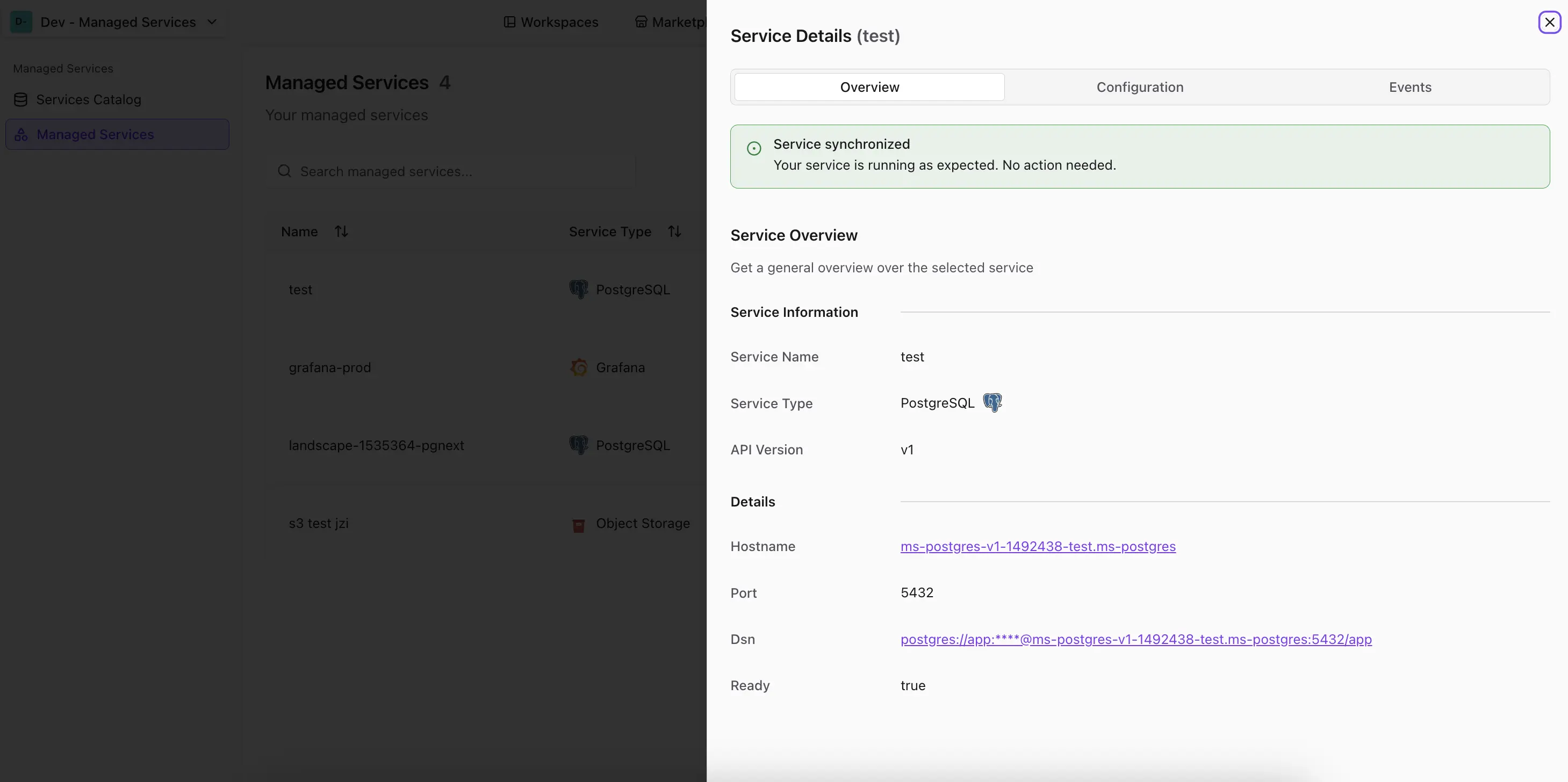
Properties defined in the detailsSchema are provided by the service at runtime — for example, the PostgreSQL hostname. They are read-only and can be inspected in the details section of the service settings.
Default landscape details
For landscape-based providers, the following details are always computed and returned automatically:
| Key | Value |
|---|---|
hostname | The landscape's URL. |
service_url_<serverName>_<port> | The URL of a service, one entry per service defined in the landscape. |
For example, a landscape with a frontend service on port 3000 produces service_url_frontend_3000. To show these values on the service's details page, declare them in your detailsSchema:
detailsSchema:
  type: object
  properties:
    hostname:
      type: string
      format: uri
    service_url_frontend_3000:
      type: string
      format: uri
Dynamic Details with x-endpoint
The detailsSchema supports a custom OpenAPI extension x-endpoint that allows you to fetch runtime details dynamically from your service. This is useful for retrieving live status information, metrics, or other data that changes after provisioning.
When x-endpoint is set on a property, Codesphere fetches the value from the specified endpoint at runtime and validates it against the property's schema.
The endpoint URL is a template: you can reference other detail fields with the ${{ .field_name }} syntax, and Codesphere substitutes their values before making the request. This lets you build the endpoint from details that are only known after provisioning — such as the default service_url_* fields.
detailsSchema:
  type: object
  properties:
    service_url_frontend_3000:
      type: string
      format: uri
      readOnly: true
    status:
      type: object
      properties:
        state:
          type: string
      # ${{ .service_url_frontend_3000 }} is replaced with that detail's value at runtime
      x-endpoint: '${{ .service_url_frontend_3000 }}/health'
In this example, the status property is fetched from the frontend service's /health endpoint. The template resolves ${{ .service_url_frontend_3000 }} to the running service's URL, so the final request goes to <service-url>/health, and the JSON response populates status.state.
Only GET requests are supported for x-endpoint. The endpoint must return JSON matching the property's schema definition.
Supported Formats
Provider schemas support the standard OpenAPI format values for validation:
int32, int64, float, double, byte, binary, date, date-time, password, uri, hostname
Beyond validation, some formats change how a value is rendered in the Codesphere UI:
| Format | Effect in the UI |
|---|---|
uri, hostname | In the details section of the service settings, the value is rendered as a clickable link instead of plain text. Use it for detailsSchema properties such as hostname or service_url_*. |
password | In the create service dialog, the corresponding secretsSchema field is rendered as a masked password input rather than a plain text field. A button next to the input generates a random value. |
detailsSchema:
  type: object
  properties:
    hostname:
      type: string
      format: uri        # rendered as a link in the details section
      readOnly: true

secretsSchema:
  type: object
  properties:
    admin_password:
      type: string
      format: password   # rendered as a masked input in the create dialog
Generated passwords
Properties with format: password in the secretsSchema get a button that fills the input with a random value. The button only appears if the property provides a schema without minLength or maxLength. The OpenAPI spec is ambiguous about how length limits interact with a pattern, so such fields are left to the user. A pattern must be anchored with ^...$.
secretsSchema:
  type: object
  properties:
    admin_password:
      type: string
      format: password
      pattern: '^[A-Za-z0-9]{24}$'
The value matches the pattern. Without a pattern, 20 characters from [a-zA-Z0-9!@#$%^&*] are used. Values are generated in the user's browser with a cryptographically secure random number generator and can be edited before submitting.
Lookaheads such as (?!postgres$) are ignored during generation. Describe the allowed characters with character classes and quantifiers so the pattern can produce a valid value.
Passing Configuration and Secrets to Landscapes
When a service is created from a landscape-based provider, the user's input is passed down to the landscape: properties from the configSchema are set as environment variables, and secrets from the secretsSchema are injected into the landscape's vault. Both can be referenced in the landscape's ci.yml:
schemaVersion: v0.2
run:
  my-service:
    steps:
      - command: ./start.sh
    env:
      APP_VERSION: ${{ workspace.env['APP_VERSION'] }}
      ADMIN_PASSWORD: ${{ vault.ADMIN_PASSWORD }}
In this example, APP_VERSION is a property of the provider's configSchema and ADMIN_PASSWORD is a property of the provider's secretsSchema.
Capabilities
capabilities is an optional map that declares which lifecycle features a provider's backend supports. Each entry is a boolean and is surfaced in the service UI: true renders a checkmark, false renders an explicit cross ("not supported"), and an omitted capability is hidden entirely.
| Capability | Description |
|---|---|
pause | The service can be paused and later resumed, releasing compute while its data is retained. |
backups | The service supports backups to an external store. Requires the backups schema block. See Managed Service Backups. |
pointInTimeRecovery | The service can be restored to an arbitrary moment in time, not only to discrete backup snapshots. |
highAvailability | The service can run in a highly available configuration (e.g. redundant replicas with failover). |
Capabilities describe what a provider's backend implements. Landscape-based providers can't support any of these capabilities yet.
Plans and Resource Parameters
Landscape-based providers do not yet have configurable plans.
A REST-based provider describes its billable resources in two parts that work together:
resourceParametersdeclares which resources exist and how they are validated — defined once at the provider level.plansare named presets that pin concrete values for those resources — a quick, no-thinking choice for the user (Small,Medium, …).
Your backend never sees this rich definition. When a service is created or updated, Codesphere resolves the selected plan and sends your backend only the flat values (see Create a Custom REST Backend):
{ "plan": { "parameters": { "storage": 10240, "cpu": 5, "memory": 512 } } }
Resource Parameters
Each entry under resourceParameters has two fields:
| Field | Description |
|---|---|
pricedAs | Tags the parameter for usage tracking and billing. One of cpu-tenths, ram-mib, storage-mib, network-bandwidth-mbps, replicas, or free. Defaults to free. For a truly cost-neutral option, prefer a configSchema property instead. |
schema | An OpenAPI schema object validating the value — always numeric (type: integer or type: number). Supports minimum, maximum, description, and x-update-constraint, just like configSchema. |
Mark a parameter readOnly: true to pin it: users can't change it directly, so a plan is the only way to set a different value. Leave it configurable (the default) to let users fine-tune the plan's value within the schema's minimum/maximum bounds.
Because the schema lives here and not in each plan, a limit or constraint is written once and applies to every plan — no repetition, and nothing to keep in sync.
Plans
Each plan supplies a concrete value for every key in resourceParameters:
| Field | Description |
|---|---|
id | Integer, unique within the provider. Identifies the plan when a service is created. |
name | Short label shown in the UI (e.g. Small). |
description | Human-readable summary of the tier (e.g. 0.5 vCPU / 500 MB Memory). |
parameters | A flat map of resourceParameter name → value. Each value is the plan's default for that parameter — pinned when the parameter is readOnly, otherwise the starting point the user can adjust. |
All plans share the same schema, so every plan should provide a value for each parameter declared in resourceParameters.
Plans are optional. Omit plans (or set it to an empty array) to skip plan selection entirely — Codesphere then sends no plan to your backend, and your backend decides what to deploy.
Provider Versions
Every landscape-based provider must define at least one entry in versions. Each version pins the exact state of the landscape that gets deployed:
gitRef: A commit hash, branch, or tag of the landscape repository.ciProfile: The CI profile from the landscape'sci.ymlto use for deployment.appVersion(optional): A human-readable label for the deployed application version.description(optional): Markdown-formatted release notes shown to the user.
A provider that deploys from a static build artifact sets backend.landscape.staticBuildArtifact instead of gitUrl, and each version pins an artifactTag instead of gitRef and ciProfile. See Consuming Static Builds.
When creating a service, users choose which version to deploy. Users can change the version of their deployed services, triggering an upgrade or downgrade. For more information, see Upgrading to a new Version.
backend.landscape.ciProfile and backend.landscape.gitRef used to define these values once for the whole provider. They are deprecated — ciProfile and gitRef are now defined per version — but remain available for backward compatibility.
Creating a Provider in the UI
Instead of writing the provider file by hand, you can author a definition in the Codesphere UI and publish it straight to the catalog. It's a form-based editor for the same provider schema described above, with a live preview of the resulting definition that you can copy or download as YAML or JSON — for example to commit it as provider.yml in your repository. Everything the fields require and produce is exactly what's documented earlier on this page.
| Tab | Option | What it does |
|---|---|---|
| Create Provider Definition | Start from Landscape | Reads a ci.yml from a Git repository and pre-fills the form from it. |
| Create Provider Definition | Start from Scratch | Opens an empty form. |
| Import Provider Definition | From Git Repo | Fetches an existing provider file from a Git repository and loads it into the form. |
| Import Provider Definition | Paste Schema | Loads a provider definition you paste in as YAML or JSON. |
Whichever option you pick, Start takes you to the same editor — the entry point only decides how much of the form is already filled in.
Create definition
Use the Create Provider Definition tab to author a new provider — either derived from a landscape you already have, or from an empty form.
- Start from Landscape
- Start from Scratch
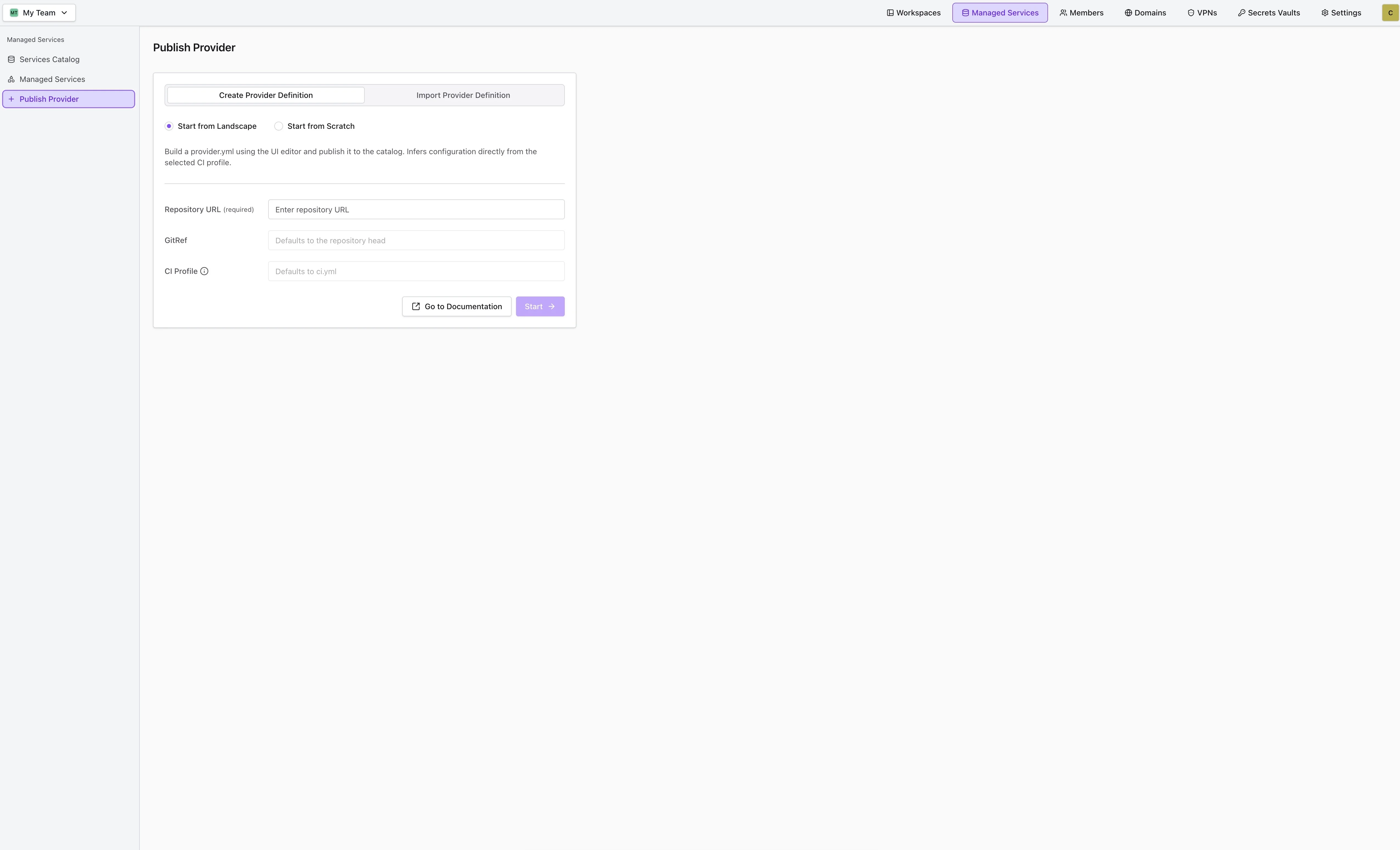
Start from Landscape infers a first draft of the definition from an existing landscape repository, so you don't have to transcribe what the ci.yml already declares.
| Field | Description |
|---|---|
| Repository URL | The landscape repository. It must be reachable by one of the Git providers connected in your personal Git permission settings. |
| GitRef | Optional commit, branch, or tag. Defaults to the repository head. |
| CI Profile | Optional profile name (e.g. prod, resolved to ci.prod.yml) or an explicit file path (e.g. ci.dev.yml). Defaults to ci.yml. |
Codesphere fetches and parses the selected CI profile, then pre-fills:
name— slugified from the repository name (lowercased, with anything outsidea–z,0–9,-, and_replaced by-).configSchema— one entry per${{ workspace.env.KEY }}reference found in the profile.secretsSchema— one entry per${{ vault.KEY }}reference found in the profile.backend.landscape.gitUrl, plus a firstversionsentry0.0.1pinned to thegitRefandciProfileyou entered.
Everything inferred this way is a starting point — edit, add, or remove entries in the form before publishing. Because the inference is tied to a landscape, the backend type stays Landscape; use Start from Scratch or an import to author a REST-based provider.
Start from Scratch takes no input — press Start to open an empty form and fill in every field yourself.
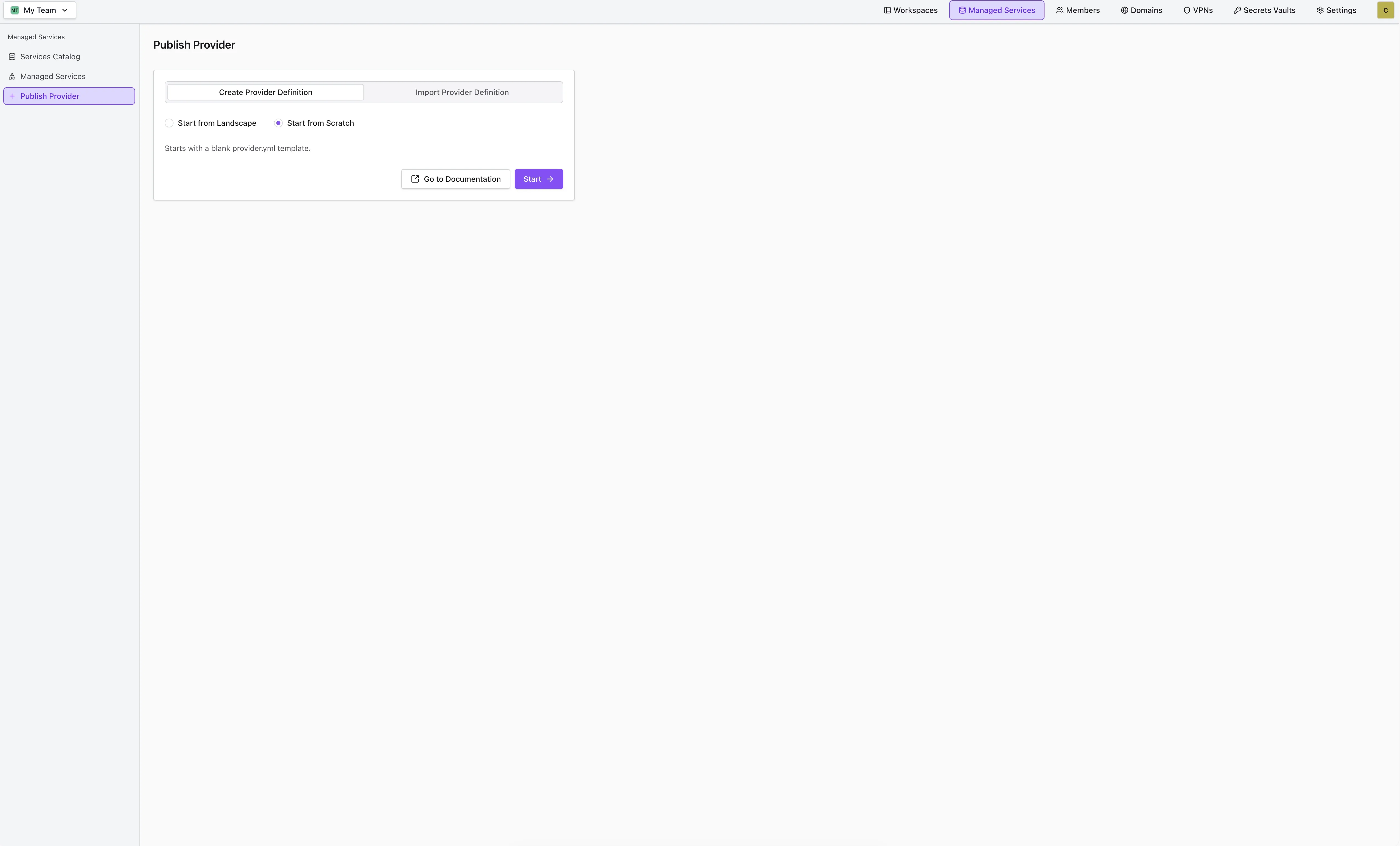
The form opens with schemaVersion set to v1, the backend type set to Landscape, and a single hostname entry pre-seeded in the details schema — everything else is blank. Unlike Start from Landscape, the backend type stays editable here, so this is the way to author a REST-based provider from nothing.
Importing an Existing Definition
Use the Import Provider Definition tab when a provider definition already exists — to refine a definition you keep in Git, to adapt someone else's provider, or to re-edit a definition you previously exported from the preview panel.
- From Git Repo
- Paste Schema
Import the provider file straight from a repository:
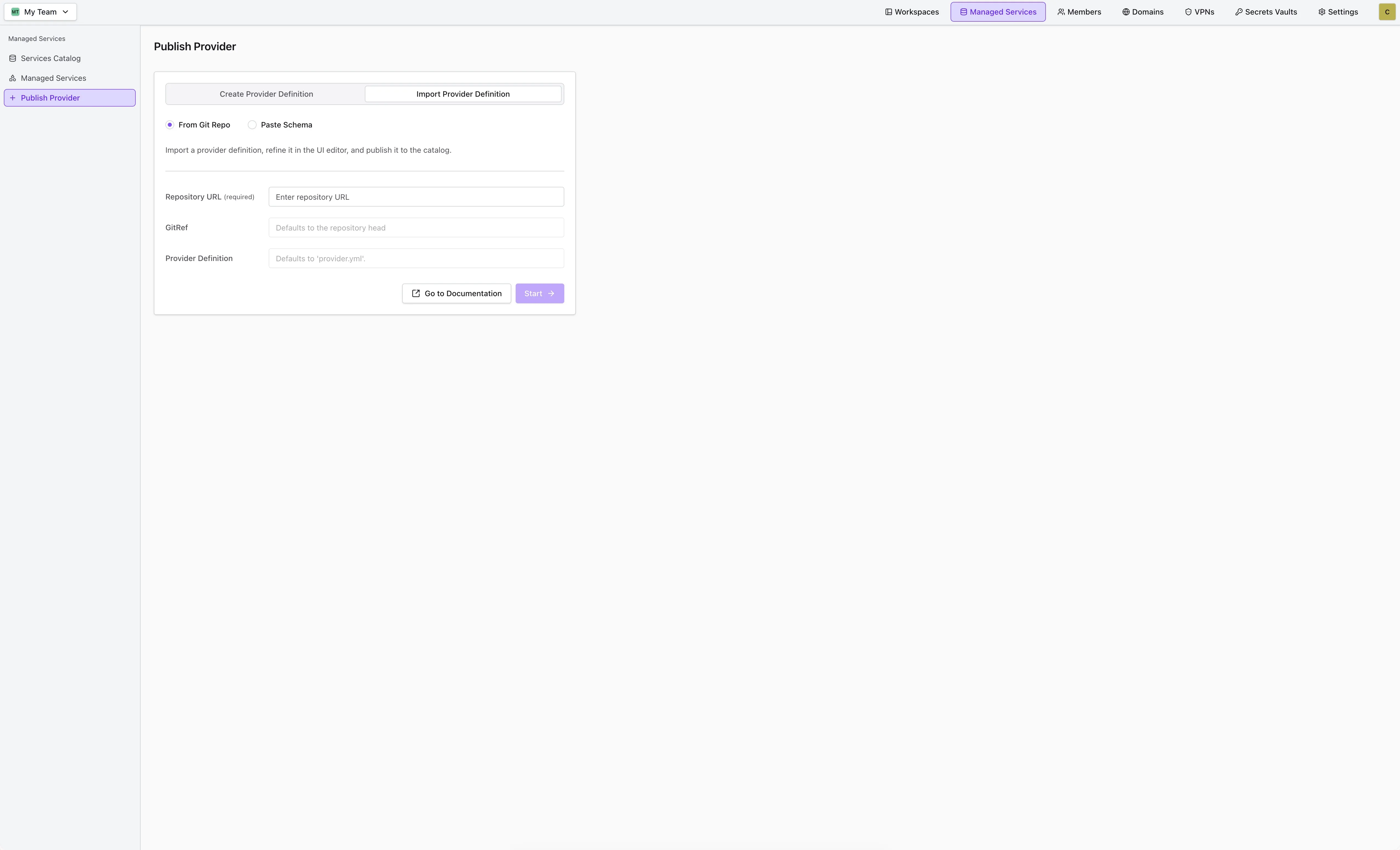
| Field | Description |
|---|---|
| Repository URL | Repository containing the provider file. |
| GitRef | Optional commit, branch, or tag. Defaults to the repository head. |
| Provider Definition | Optional path to the provider file. Defaults to provider.yml at the repository root. |
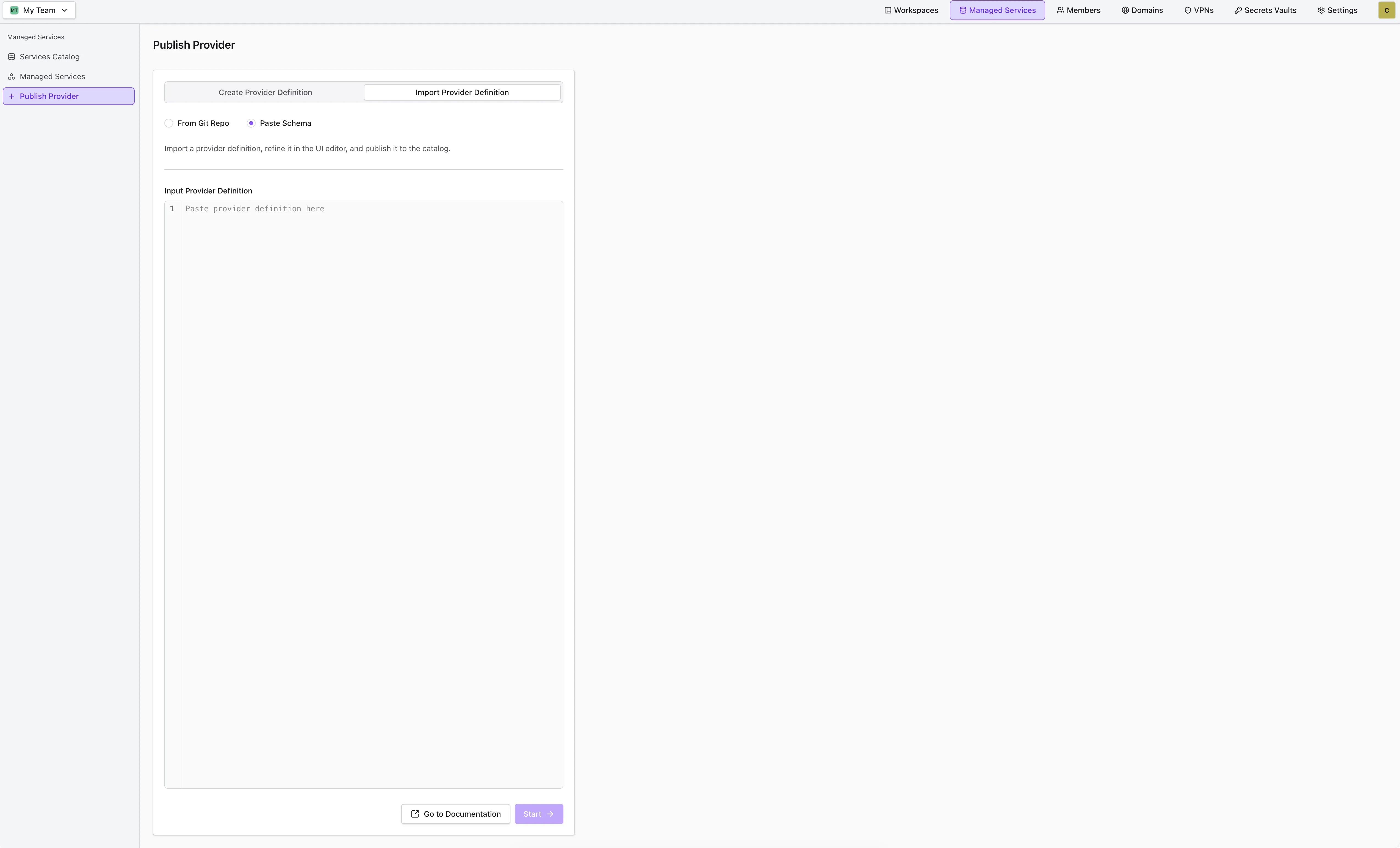
Paste a complete provider definition into the editor. Both YAML and JSON are accepted, and the content is validated against the provider schema when you press Start — if it isn't a valid definition, the dialog reports the parse error and stays open.
Filling in the Form
The form is organized into sections that mirror the provider schema — Core, Metadata, Configuration Options, Instance Details, Secrets Schema, Plans & Resource Parameters, and, for landscape-based providers, Versions. The Provider Definition Preview next to it updates as you type, so you always see the definition you're about to publish.
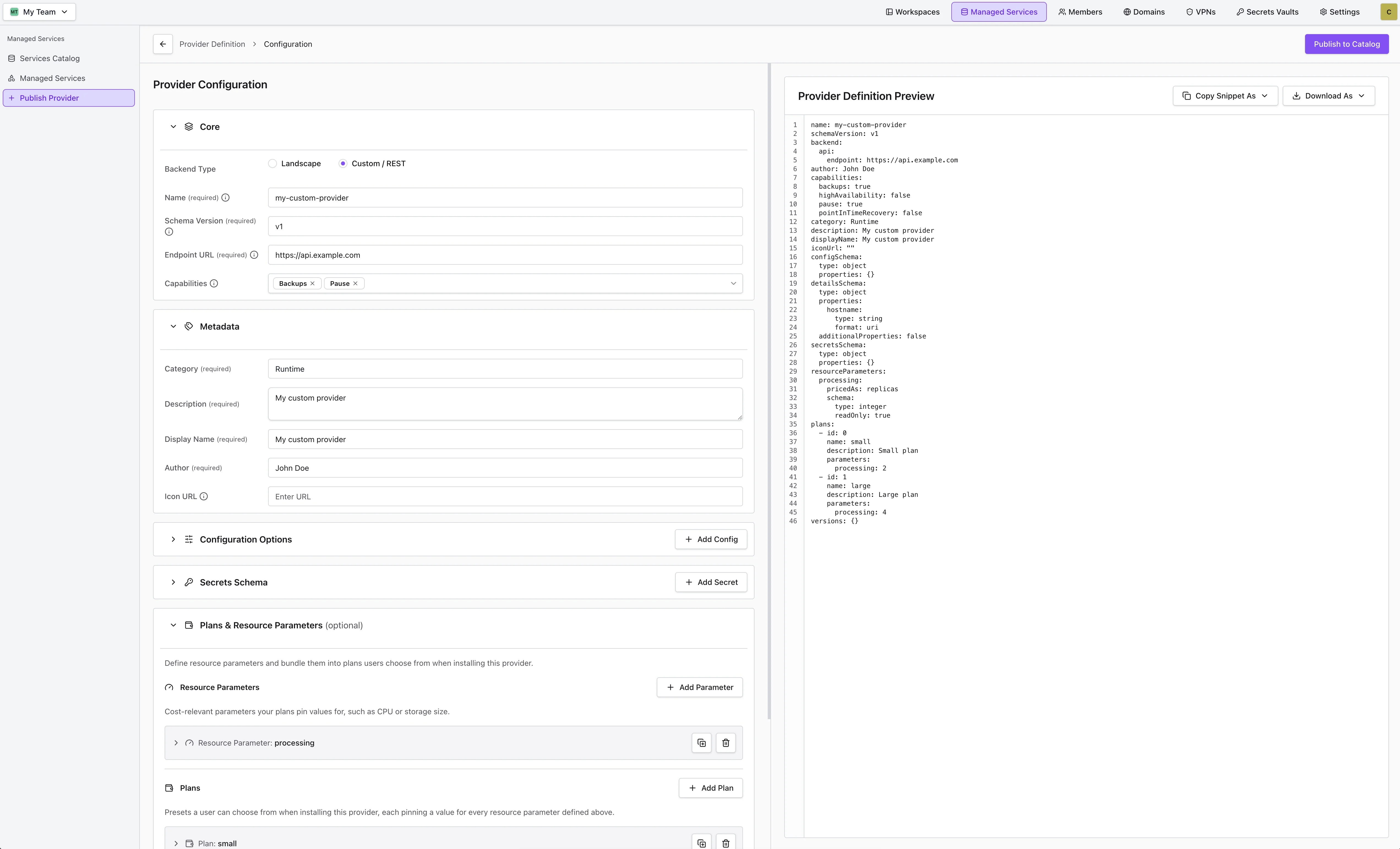
Copy Snippet As and Download As export the previewed definition as YAML or JSON. Export is enabled once the definition is valid — for a landscape-based provider that means at least one version, plus valid config, details and secrets sections. Committing the exported file as provider.yml in your repository is what makes the Git-based publishing flows work later on.
Publishing from the Editor
Publish to Catalog opens the publish dialog:
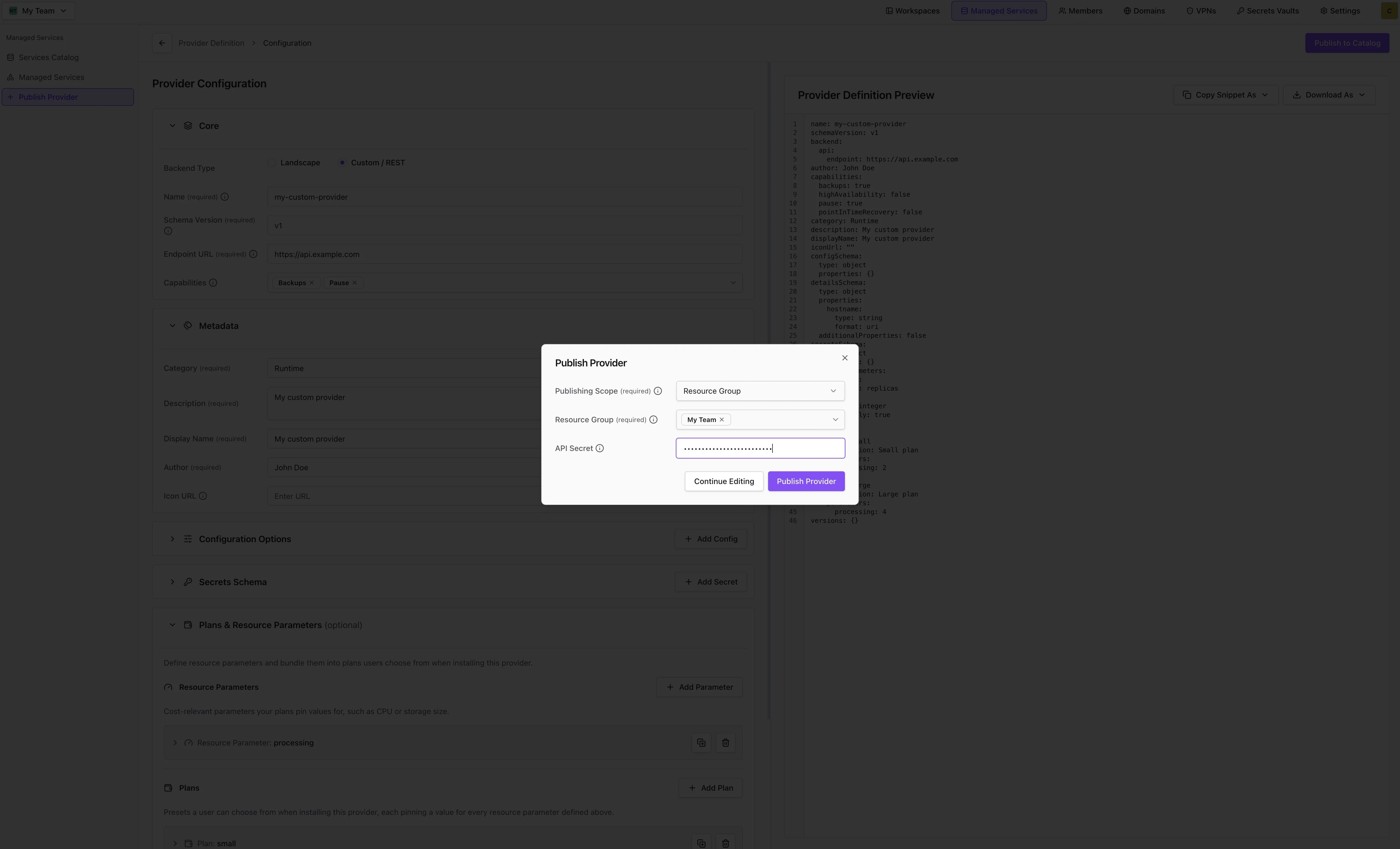
| Field | Description |
|---|---|
| Publishing Scope | Resource Group publishes to the resource groups you select; Global publishes to the whole organization and requires cluster admin permissions. See Provider Scopes. |
| Resource Group | Shown for the Resource Group scope. Lists only the resource groups where you are an admin. |
| API Secret | Shown for REST-based providers only. Optional bearer token Codesphere sends in the auth header of every request to your endpoint. It is kept out of the form and the preview, so it never ends up in an exported provider file. |
Publishing performs the same idempotent upsert as PUT /managed-services/providers: if no provider with the same name and schemaVersion exists, it is created; if one does, its mutable fields are updated in place. Publishing an edited definition again therefore updates the existing provider rather than creating a second one — and publishing under a name that is already taken overwrites that provider, so pick a distinct name unless you intend to update it.
After a successful publish you are redirected to the Services Catalog, where the provider is now available to the scopes you selected.
Publishing and Managing Providers
Once a provider is defined, you publish it to Codesphere through the Codesphere Public API — or, if you authored it in the provider editor, directly from there. The publish, update, delete, scope, and singleton mechanics described below are the same for both landscape-based and REST-based providers.
Publishing providers requires cluster admin permissions. Resource group admins can request providers to be scoped to specific resource groups.
Provider Scopes
When creating a provider, you can define its visibility scope:
| Scope Type | Description |
|---|---|
global | Available to all resource groups in the Codesphere instance. Requires cluster admin permissions. |
team | Available only to specified resource groups. Provide an array of teamIds. |
Make the provider available to everyone in the instance:
"scope": {
  "type": "global"
}
Restrict the provider to specific resource groups:
"scope": {
  "type": "team",
  "teamIds": [1, 24, 56]
}
Publishing and Updating a Provider
The recommended way to publish and update a provider is the idempotent upsert endpoint. Send a PUT request to /managed-services/providers:
- If no provider with the same
nameandschemaVersionexists yet, it is created. - If one already exists, all mutable fields are updated in place.
This means you can use the same request to create a provider and to roll out later changes — you don't need to track whether the provider already exists. This is useful in CI/CD pipelines, for example.
You can either provide a Git URL that includes the provider file or the full provider specification in the payload.
Dedicated create (POST) and update (PATCH) endpoints still exist for partial updates and more explicit workflows, but for most cases the upsert endpoint is the simplest choice. See Updating a Provider in Place.
For landscape-based providers you can add new entries to versions, but existing version records cannot be modified or removed through an upsert. All other provider fields are updated in place.
- Fetch the provider file from Git
- Provide the full specification
The simplest approach is to provide the Git repository URL. Codesphere will fetch and validate the provider file from your repository automatically. By default it looks for provider.yml at the repository root; if that file is not found, it falls back to provider.yaml.
If you omit gitRef, the default branch of the repository is used to fetch the provider file.
To use a different file name or location — for example to keep several provider files in one repository — pass the optional filepath argument. It is resolved relative to the repository root and defaults to provider.yml when omitted.
The scope and filepath are not part of the provider file — you provide them here, in the publish request, alongside the Git URL:
curl -X PUT "https://<your-codesphere-url>/api/managed-services/providers" \
  -H "Authorization: Bearer YOUR_API_KEY" \
  -H "Content-Type: application/json" \
  -d '{
    "gitUrl": "https://github.com/your-org/mattermost-landscape",
    "gitRef": "my-branch",
    "filepath": "config/prov-definition.yml",
    "scope": {
      "type": "global"
    }
  }'
For more control, or if you don't want to include a provider file in your repository, you can provide the complete provider specification directly in the API request. The payload is the provider definition plus a scope. Use backend.landscape for a landscape-based provider or backend.api for a REST-based provider.
curl -X PUT "https://<your-codesphere-url>/api/managed-services/providers" \
  -H "Authorization: Bearer YOUR_API_KEY" \
  -H "Content-Type: application/json" \
  -d '{
    "name": "mattermost",
    "schemaVersion": "v1",
    "author": "Your Team",
    "displayName": "Mattermost",
    "iconUrl": "https://example.com/mattermost-icon.png",
    "category": "collaboration",
    "description": "Open-source team messaging platform.",
    "teamSingleton": true,
    "backend": {
      "landscape": {
        "gitUrl": "https://github.com/your-org/mattermost-landscape"
      }
    },
    "configSchema": {
      "type": "object",
      "properties": {
        "SITE_NAME": { "type": "string", "description": "Display name" },
        "MAX_USERS": { "type": "integer", "description": "Maximum number of users" }
      }
    },
    "secretsSchema": {
      "type": "object",
      "properties": {
        "ADMIN_PASSWORD": { "type": "string", "format": "password" }
      }
    },
    "detailsSchema": {
      "type": "object",
      "properties": {
        "hostname": { "type": "string" },
        "port": { "type": "integer" }
      }
    },
    "plans": [],
    "scope": {
      "type": "team",
      "teamIds": [42, 43]
    },
    "versions": {
      "1.0.0": {
        "appVersion": "Mattermost v11.10.1",
        "ciProfile": "prod",
        "gitRef": "release-tags/1-0-0",
        "description": "Long Term Support Release"
      }
    }
  }'
For a REST-based provider, the payload has the same shape but uses backend.api (and omits versions):
{
  "name": "postgres",
  "schemaVersion": "v1",
  "displayName": "PostgreSQL",
  "backend": {
    "api": {
      "endpoint": "http://ms-backend-postgres.postgres-operator:3000/api/v1/postgres",
      "secret": "shared-token"
    }
  },
  "capabilities": { "pause": true, "backups": true, "pointInTimeRecovery": true, "highAvailability": true },
  // configSchema, secretsSchema, detailsSchema, plans, backups ...
  "scope": { "type": "global" }
}
Updating a Provider in Place
You can edit a published provider from its card in the Services Catalog or send a PATCH or PUT request to /managed-services/providers/{name}/{schemaVersion}.
Changes to the provider schema need to be backwards compatible. A breaking change, such as removing a field or making a new field required, can break existing services. As the publisher, you are responsible for keeping schema changes compatible.
To change specific fields without resubmitting the whole definition, use the PATCH endpoint. Only the fields you include are changed; all other stored fields are preserved.
curl -X PATCH "https://<your-codesphere-url>/api/managed-services/providers/{name}/{schemaVersion}" \
  -H "Authorization: Bearer YOUR_API_KEY" \
  -H "Content-Type: application/json" \
  -d '{
    "displayName": "My Updated Service",
    "backend": {
      "api": {
        "endpoint": "https://new-endpoint.example.com",
        "secret": "new-secret"
      }
    }
  }'
When updating backend.api, fields you omit are preserved — so you can update the endpoint while leaving the stored secret unchanged, or include a new secret to rotate it.
The secret field in backend.api is stored securely but is never included in the API response. This applies to the PATCH, PUT, and POST responses for REST-based providers.
Deleting a Provider
Deleting a provider is global. The provider is removed from the catalog for every resource group it is available to. Active services of this provider stop reconciling and may degrade.
You can delete a provider from its card in the Services Catalog, or send a DELETE request to /managed-services/providers/{name}/{schemaVersion}:
curl -X DELETE "https://<your-codesphere-url>/api/managed-services/providers/{name}/{schemaVersion}" \
  -H "Authorization: Bearer YOUR_API_KEY"
The name and schemaVersion path parameters identify the provider to delete.