Managed Services Overview
Managed services allow you to deploy and manage services & dependencies alongside your application code. It ships with a set of core services that are fully managed by Codesphere, while also serving as a foundation for additional custom & ecosystem maintained service providers, giving you the ability to create and offer your own services, whether they run within the Codesphere cluster or connect to external systems through a custom REST backend.
API-First
Every operation in the module, from publishing providers to deploying and managing services, is available through the Codesphere Public API. This makes it possible to fully automate service management or build entirely custom workflows on top of it.
Use Cases
Managed services support a range of scenarios, from provisioning common application dependencies to building a full internal developer platform on top of Codesphere.
Application Dependencies
The service catalogue includes managed dependencies like databases and object storage that your applications consume directly. Instead of setting up and operating these backing services yourself, you deploy them from the catalogue. Codesphere handles provisioning, lifecycle management, and connectivity. Your application connects to these services over a private network, and you manage them through the UI or the public API.
Internal Developer Platform
Beyond core services, the module supports building an Internal Developer Platform (IDP). Platform teams create landscape-based service providers to package applications into reusable services that other teams deploy with a single click, without needing to understand the underlying setup. Instead of stitching together separate tools for deployment automation, developer portals, and service catalogs, the entire workflow lives inside one platform.
Architectural Overview
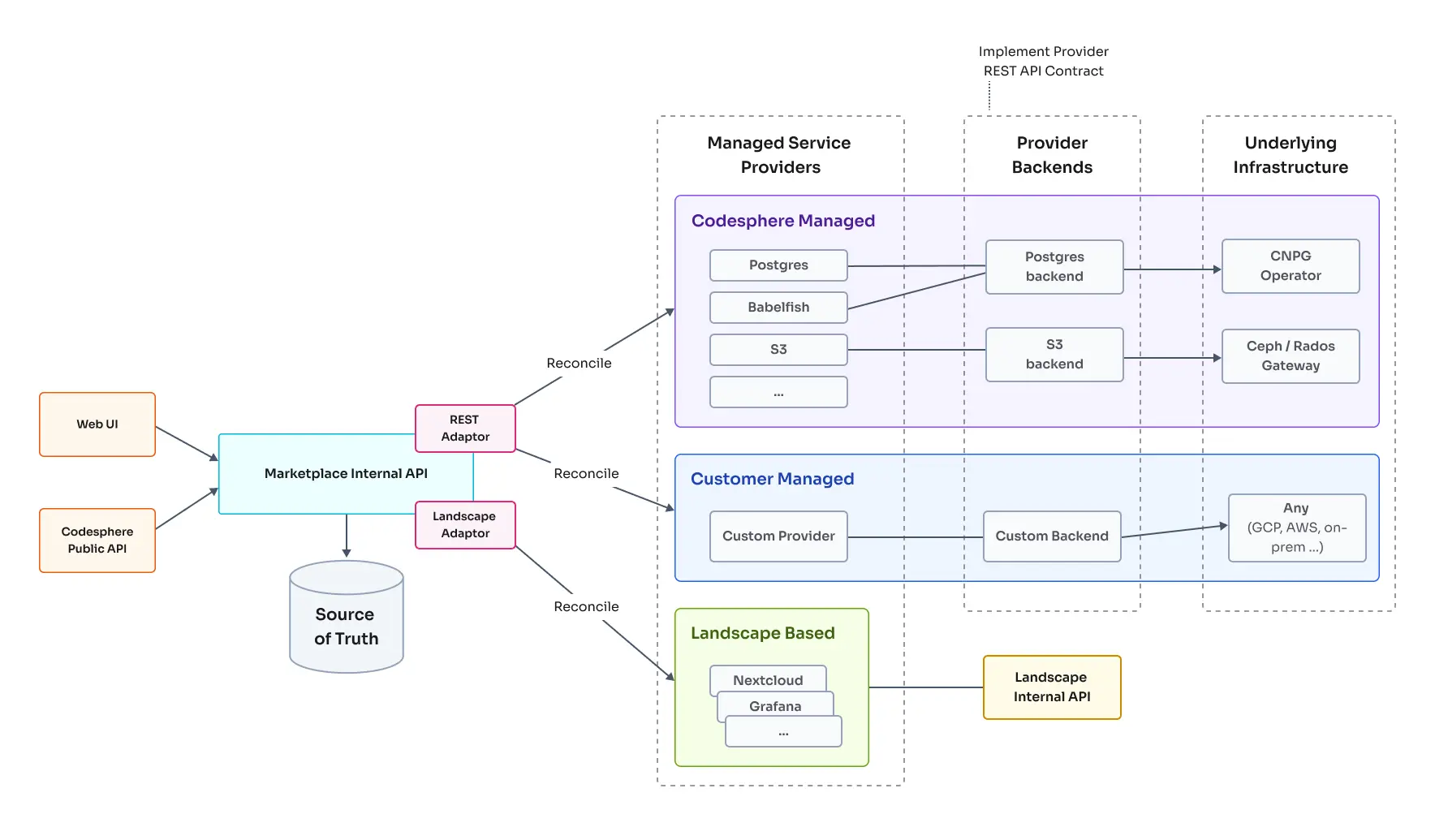
The architecture is built around three core elements. Service Providers define what a service is and how it is configured. Provider Backends connect providers to the underlying compute. Service Infrastructure is where the actual services are provisioned and run.
These three elements work together in a continuous loop: users select and configure services through Codesphere's UI or the public API, Codesphere tracks their desired state in its internal database, and the reconciler continuously polls the backends to ensure the infrastructure matches what was requested.
Corresponding accessible text description
Service Providers
Opening the Managed Services tab in Codesphere displays a grid of available providers. Each card in this grid represents a single service provider.
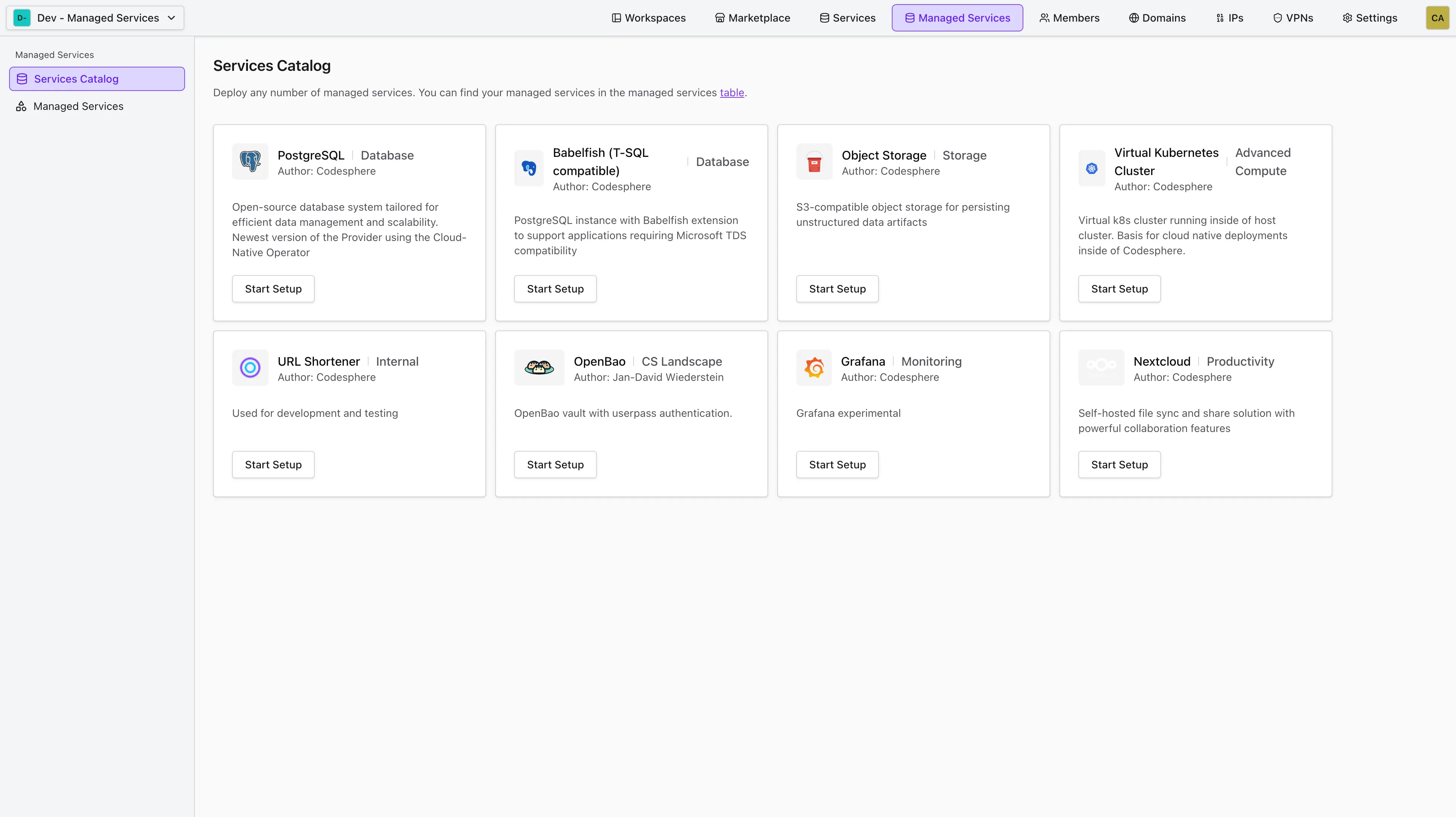
A provider is a reproducible blueprint for deploying a specific type of service. Providers are defined through the CRUD operations of the public API's provider endpoint, through the cluster configuration, or (for landscape-based providers) in a provider.yaml file. A single provider can back multiple deployments. For example, you could deploy several independent PostgreSQL databases from the same provider, each with its own configuration.
Creating custom providers
You can learn more about how to create a provider in the Creating Service Providers article.
Provider Backends
A provider backend connects a provider to the actual compute the service will be provisioned on. It is responsible for executing all creation, update, and deletion operations for a given service and exposes the current service status back to the Codesphere reconciler.
Codesphere provides its own backends for all core services. Some of these share underlying resources: for example, both the PostgreSQL and Babelfish providers use a shared backend. Beyond the core services, you can create custom backends that connect to any system you operate, whether that is a cloud provider, an on-premise system, or a proprietary application. This means you can bring existing systems into the Codesphere ecosystem without having to migrate or rebuild them. Everything your backend exposes becomes a first-class managed service, consumable through the standardized Codesphere API and UI, with full lifecycle management and reconciliation.
Creating custom REST backends
You can learn more about how to create a backend in the Create a Custom REST Backend article.
Service Infrastructure
The service infrastructure is where the actual service is provisioned and runs. For Codesphere core services, this infrastructure resides within the Codesphere cluster itself. For custom services, it can be any infrastructure you choose: a hyperscaler, an on-premise system, or a combination of both.
When a backend receives a request to create, update, or delete a service, it is the service infrastructure where those operations are carried out.
Service Categories
Every managed service falls into one of two categories based on who is responsible for providing and operating it.
Codesphere Managed
Codesphere-managed services are common dependencies like databases and object storage that ship with the platform out of the box. Codesphere maintains and operates the full stack for these services: the provider, the backend, and the underlying infrastructure, all running within the Codesphere cluster.
Each core service has a dedicated provider backend that implements the Provider REST API contract. Examples include PostgreSQL, Babelfish, and S3-compatible object storage (backed by Ceph/Rados Gateway).
Because Codesphere controls every layer, these services are fully managed, including provisioning, updates, scaling, monitoring and if applicable SLAs.
Ecosystem / Self Managed
These managed services are defined, operated and maintained by someone other than Codesphere. You can draw upon service providers from the ecosystem or create and provide the service provider, implement or configure the backend, and choose where the service runs yourself. This gives you full flexibility to integrate also external services into the Codesphere service catalogue. Unlike the core services maintained by Codesphere, these are self-managed. When you create these instances, they reside within the customer application layer rather than the PaaS layer, making them the user's responsibility.
These managed services can be set up in one of two ways:
Landscape-based
A Landscape in Codesphere is a deployment configuration of your application, fully defined by a single ci.yml file. It describes your services, their dependencies, and how they connect through a secure private network.
Landscape-based managed services use this concept to deploy services directly as Landscape workloads within the Codesphere cluster. Instead of implementing a custom REST backend, the platform orchestrates these services internally through the Landscape API. This makes it straightforward to turn any deployed application or those with well maintained open source deployment recipes, such as Nextcloud or Grafana, into a managed service without writing any backend code. You can learn more about creating one in the Configuring a Landscape article.
REST-based
REST-based services let you connect Codesphere to infrastructure that lives entirely outside the platform. You implement a custom backend that conforms to the Provider REST API specification described in the Create a Custom REST Backend article, and that backend can interface with anything: a hyperscaler, an on-premise data center, a proprietary third-party application, or any combination.
This allows you to integrate existing infrastructure into the Codesphere ecosystem without migrating away from it, or to create providers that provision resources in systems Codesphere has no native integration with. The reconciler communicates with custom backends the same way it does with its own, so custom services receive the same lifecycle management, status tracking, and UI integration as core services.
When to Use What
| Scenario | Recommended Category | Why |
|---|---|---|
| You need common dependencies for which there is a corresponding Codesphere Service | Codesphere Managed | Core services are fully managed and require no setup beyond configuration. |
| You are building a new application or packaging one for other teams to consume | Customer Managed (Landscape-based) | Define your application as a Landscape and publish it as a provider. The service runs sovereign in the Codesphere cluster with no custom backend code required. |
| You want to integrate with existing external infrastructure or a proprietary system | Customer Managed (REST-based) | Implement the REST API contract to bring any external system into Codesphere as a fully managed service, without having to migrate away from it. |
Next Steps
- Deploying Services: Deploy, configure, and manage the lifecycle of a managed service.
- Creating Service Providers: Create and publish custom landscape-based or REST-based providers.
- Creating a Custom REST Backend: Implement the REST API contract for a custom backend.
- Connecting to Services: Access deployed services from your workspaces.