Managed Containers
This is a detailed guide for Managed Containers. For an overview of all runtime types and how to choose between them, see Runtimes Overview. To understand the differences between Reactives and Managed Containers, also see Codesphere Reactives.
Managed Containers allow you to bring your own OCI images to Codesphere while leveraging the platform's orchestration, networking, and monitoring capabilities. This runtime type uses the same underlying infrastructure as Codesphere Reactives, but allows you to define custom images and pre-bake dependencies via OCI images.
Overview
Managed Containers bridge the gap between the simplicity of Codesphere Reactives and the flexibility of custom container images:
| Feature | Codesphere Reactives | Managed Containers |
|---|---|---|
| Base Image | Shared Codesphere Ubuntu (customizable for private cloud) | Your own OCI image |
| Startup Time | Milliseconds | Seconds (depends on image size) |
| Dependencies | Local (npm packages, Python packages, etc.) or Nix | Pre-baked in OCI image |
| OS Distribution | Ubuntu or set by organization admin | Any (Alpine, Debian, etc.) |
| Image Registry | N/A | Docker Hub, ECR, private registries |
| Orchestration | Full platform features | Full platform features |
| Filesystem Access | Customizable shared network filesystem | Customizable shared network filesystem |
| Off-when-unused | Yes | Yes |
| Scaling & Load Balancing | Yes | Yes |
| Platform Integration | Built-in | At runtime |
Architecture
Managed Containers use the same orchestration platform as Reactives, with the key difference being the container image source:
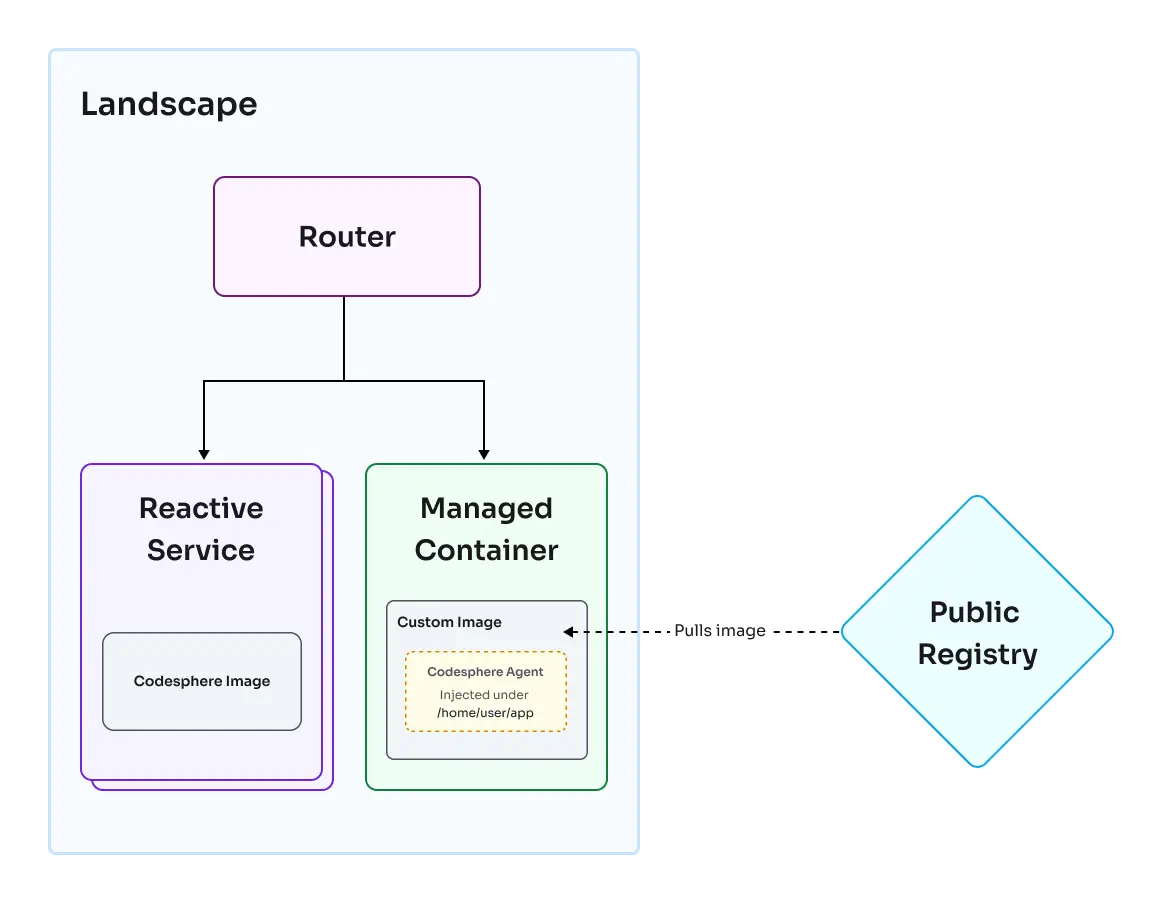
Corresponding accessible text description
Key Components
1. Custom Container Image
- Define your own base image via Dockerfile
- Pull from Docker Hub, ECR, GCR, or private registries
- Pre-bake all system dependencies and packages
- Complete control over OS distribution and version
2. Platform Orchestration
- Same Kubernetes-based orchestration as Reactives
- Health monitoring, load balancing, and auto-scaling
- Off-when-unused capabilities for resource efficiency
- Codesphere agent integrated at runtime for platform features
3. Shared Network Filesystem
- Identical filesystem access as Reactives
- Mount any file or directory to any destination in your container
- Default mount at
/home/user/appfor persistent storage - Same best practices apply (write to app directory, avoid concurrent writes)
4. Image Pull & Startup
- Container images pulled from registry on first start
- Subsequent starts may use cached images (depends on cluster state)
- Startup time typically in seconds vs milliseconds for Reactives
- Trade-off for complete image customization
Compatibility considerations
Codesphere starts an agent as PID 1 in every Managed Container to provide platform features. The command configured by your image therefore runs as a child process rather than as PID 1.
Most images do not depend on their application being PID 1. If an image does, it is not compatible with Managed Containers unless its documented configuration supports running the application as a child process.
When to Use Managed Containers
Managed Containers are ideal for:
- Existing OCI Images/Dockerfiles - Reuse existing container definitions
- Specific base OS requirements - Alpine, Debian, custom distributions
- Complex dependencies - System-level packages best managed via Dockerfile
- Open source projects - Already containerized applications
- Registry-based workflows - CI/CD that pushes images to registries
Consider Codesphere Reactives instead when:
- You don't need a specific base image
- Faster startup time is critical
- You prefer runtime dependency installation via Nix
- You're starting a new greenfield project
Commonalities with Codesphere Reactives
Both runtime types share the same underlying platform capabilities:
| Capability | Both Runtimes |
|---|---|
| Filesystem Access | Shared network filesystem at /home/user/app |
| Off-when-unused | Automatic resource deallocation during idle periods |
| Scaling | Horizontal (replicas) and vertical (plans) |
| Load Balancing | Automatic across replicas |
| Health Monitoring | Configurable health checks and auto-restart |
| Private Networking | Secure internal service communication |
| Secret Management | Vault integration for sensitive data |
| Monitoring | Logs, metrics, and request tracing |
| Platform Integration | Codesphere agent for platform features |
Using a private registry
A Managed Container boots from a custom base image (baseImage). When that image lives in a private registry, the landscape needs credentials to pull it. Codesphere supports two ways to provide them: resource group container registries (recommended) and workspace secrets (deprecated, still supported).
Resource group container registries
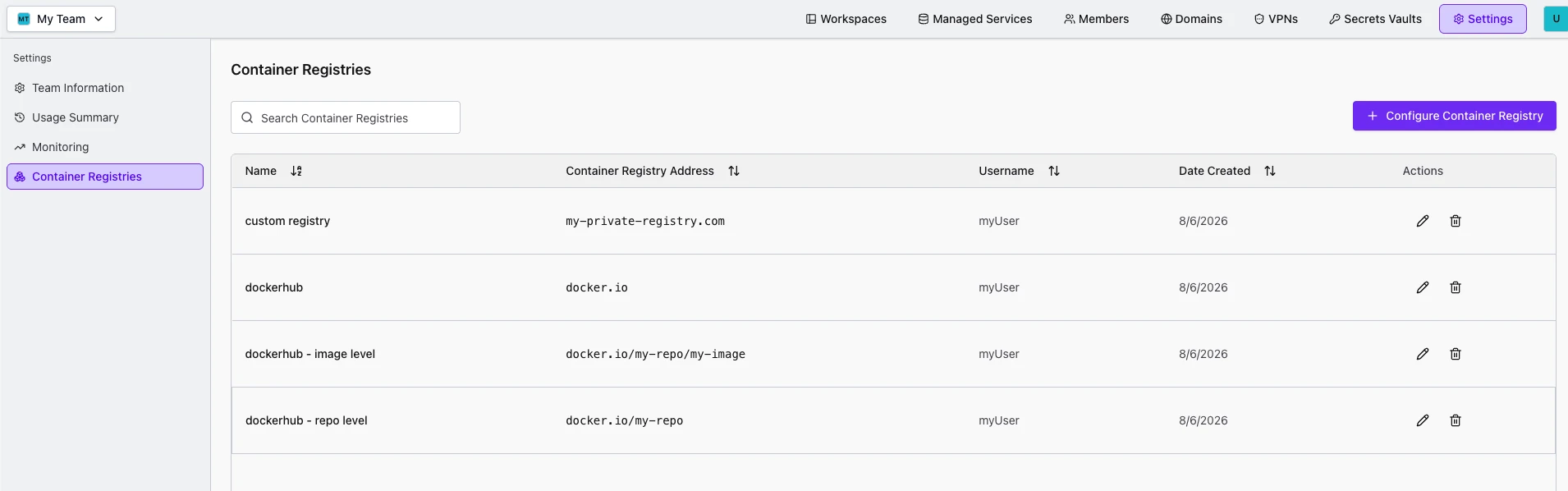
Resource Group Admins can configure registry credentials once, at the resource group level, instead of managing secrets per workspace. Codesphere matches a Managed Container's baseImage against the configured registries and uses the credentials automatically at deploy time.
- Open your Resource Group, then go to Settings > Container Registries.
- Click Configure Container Registry.
- Give the registry a Name, and set the Container Registry Address, Username, and Password/access token.
The registry address can be scoped as broadly or as narrowly as you need, the most specific matching entry for a given baseImage is used.
Resource group container registries require both the team-container-registries and cimg-private-registry feature flags to be enabled for your installation. If either is disabled, the Container Registries page is unavailable. See Feature Flags for how flags are configured.
Workspace secrets (deprecated)
This method is deprecated in favor of resource group container registries above. It remains supported for existing setups, but new configurations should use the resource group approach instead. If both resource group and workspace-level registries are configured, the resource group registry takes precedence.
You provide credentials as two workspace secrets. Codesphere reads them at deploy time and uses them to pull the image.
| Key | Value |
|---|---|
REGISTRY_USERNAME | Registry username |
REGISTRY_PASSWORD | Registry password or access token |
The key names are exact and case sensitive. Both must be present.
Store them in the workspace vault the same way as any other secret. See Secret Management for how to persist workspace secrets.
On the next redeploy, the image is pulled using these credentials if they are needed.
Private registry credentials are only read when both the secret-management and cimg-private-registry feature flags are enabled for your installation. If either is disabled, the image is pulled without credentials and a private image will fail to download. See Feature Flags for how flags are configured.
Configuration & Lifecycle
Managed Containers are configured through the ci.yml file in your repository. For comprehensive guides on configuring and managing Managed Containers, see:
- Configuring a Landscape - Complete guide to landscape configuration
- Configuring CI Pipeline - Detailed pipeline setup including prepare and run stages
- Landscape Lifecycle - Understanding deployment, scaling, and lifecycle management
- Environment Variables - Managing environment configuration
- Secret Management - Secure handling of sensitive data
- CI Profiles - Managing different configurations for dev, staging, and production