Managing Environment Variables
Hardcoding sensitive data—such as API keys, database passwords, or tokens—presents a security risk. To mitigate this, Environment Variables decouple the configuration from the codebase. Codesphere manages these variables via encrypted storage, injecting them into the application at runtime.
Accessing the Variables
You can manage your secrets in the Environment Variables tab of your Landscape.
- Open Environment Variables from the sidebar.
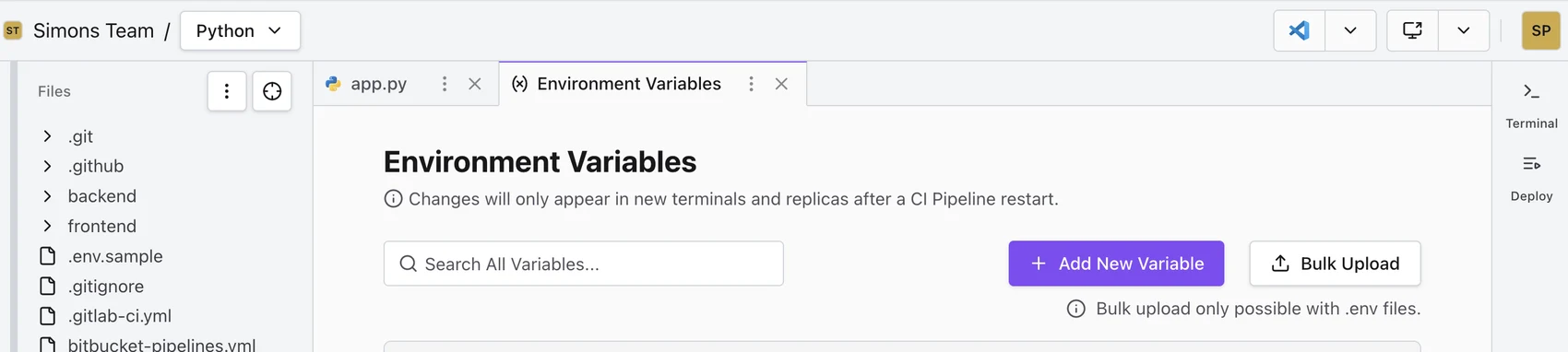
Adding a New Variable
To add a single variable:
- Click the + Add New Variable button.
- Key: Enter the name of your variable
- Value: Enter the secret value.
- Click Save.
Note: For security, once a variable is saved, its value is masked. You can view it again by clicking the eye icon next to the value.
Bulk Uploading (.env files)
If you are migrating an existing project, you likely already have a .env file. Instead of typing them in one by one, you can upload the entire file.
- Click the Bulk Upload button.
- Drag and drop your
.envfile into the modal, or click to browse. - Click Upload.
Example .env file
STRIPE_API_KEY=scr_12345
TWILIO_API_KEY=abcd1234
Important: This will overwrite any existing variables that share the same key.
Using Variables in Your Application
Once defined, these variables are available to your application just like any system-level environment variable.
- Node.js
- Python
const apiKey = process.env.KEY_NAME;
import os
api_key = os.environ.get('KEY_NAME')
In Your CI Pipeline (ci.yml): You can also reference these environment variables in your build or run commands using standard shell syntax.
run:
  steps:
    - name: SERVERNAME
      command: ./your-app-server --api-key=$KEYNAME
You can define service-specific environment variables directly in the ci.yml. See Configuring Your CI Pipeline for details.
They can also reference workspace-level environment variables defined in the UI using templating:
run:
  my-service:
    env:
      KEY_NAME: {{ workspace.env.WORKSPACE_ENV_NAME }}
Service-Level vs. Workspace-Level Variables
Codesphere environment variables exist at two scopes:
- Service-level variables are scoped to a single Landscape service and are defined directly in
ci.yml(see Configuring Your CI Pipeline) or the service's ownenvblock. They are only available to that service. - Workspace-level variables are defined in the Environment Variables tab shown above and apply to the entire Workspace — every service, plus any terminal session you open. Codesphere also sets some workspace-level variables automatically, such as
WORKSPACE_ID, which holds the ID of the current workspace.
Service-level variables can reference workspace-level ones with the {{ workspace.env.VARIABLE_NAME }} templating syntax shown above.
Changes to workspace-level environment variables only take effect in a freshly opened Workspace Terminal. A terminal that was already open when you changed or added a variable will not see the new value until you close it and open a new one.